

Home
Why the Las Vegas Mayor's Cup

PROUD SPONSOR OF THE LAS VEGAS MAYOR'S CUP


Teams and Players








Team Roster
Your team roster must be set before the roster freeze date. Log into your account at system.gotsport.com
Instructions For Adding Players To Your GotSport Roster
Step 1: Log into your team account at https://system.gotsport.com/
Step 2: Select “Team Management”
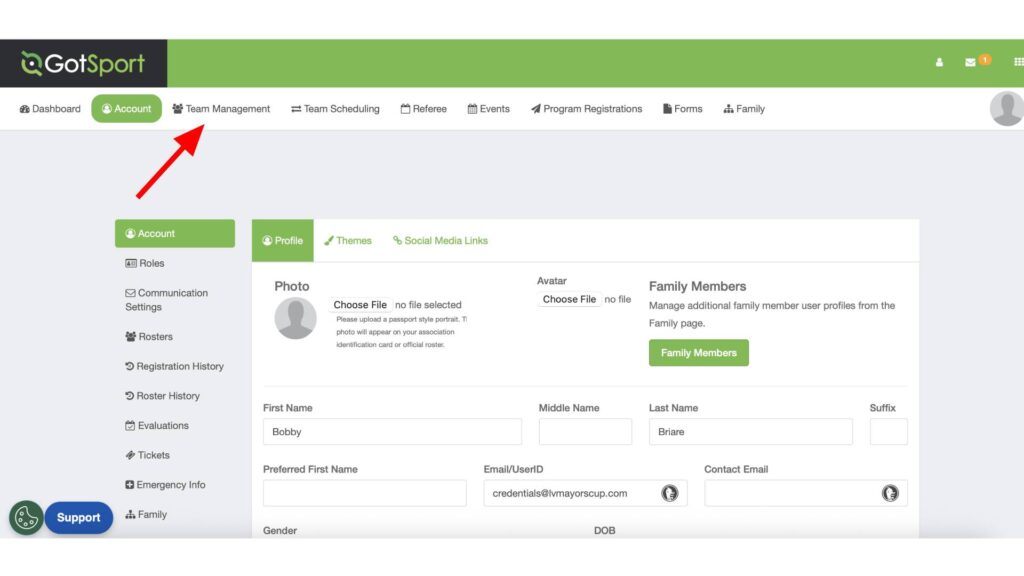
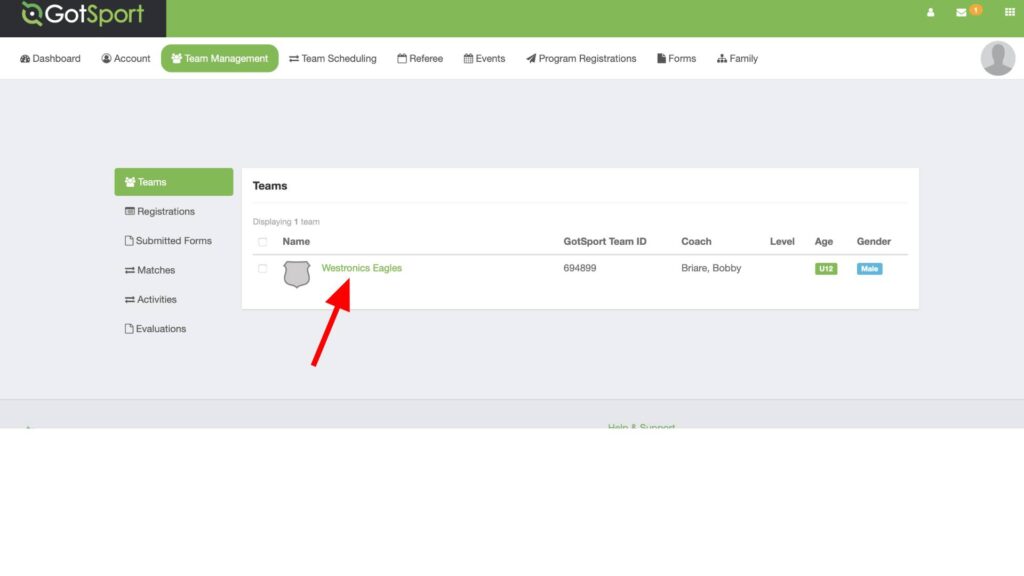
Step 3: Select the team you are working with.
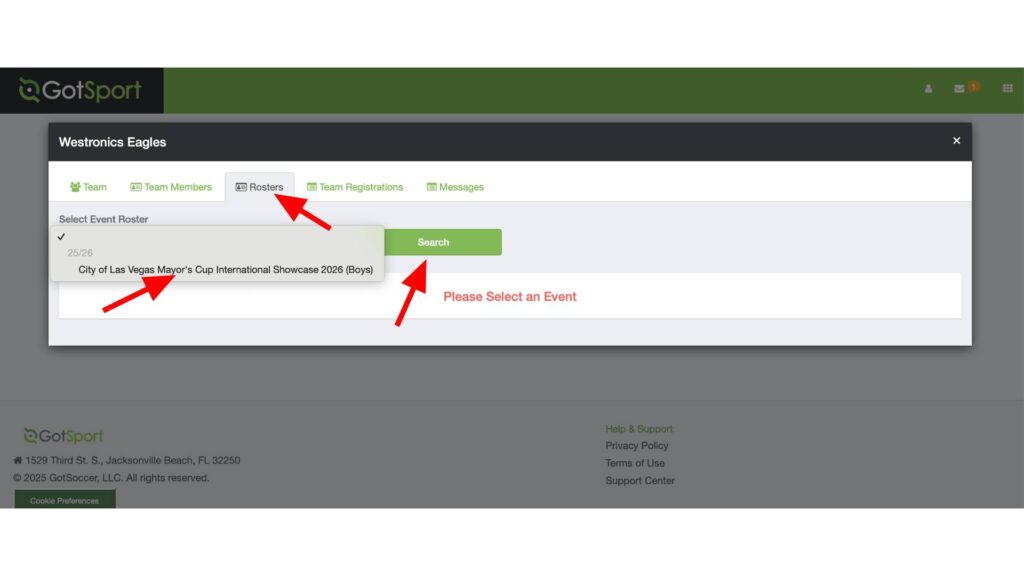
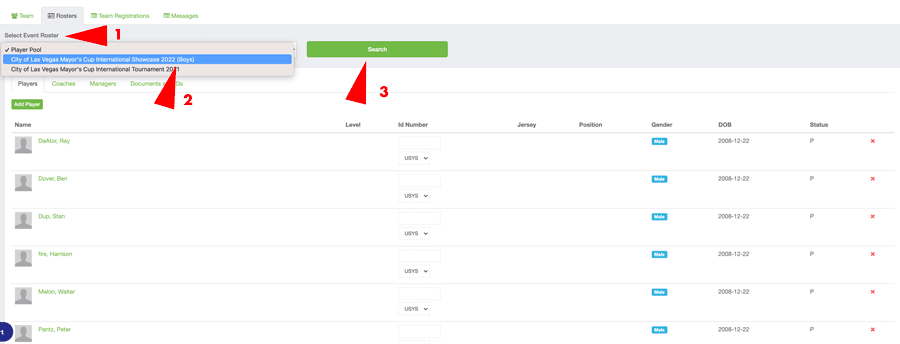
Step 4: Click on the “Roster” tab, then from the Dropdown, select the Las Vegas Mayor’s Cup. Be sure the select the correct tournament. Then click on “Search”.
Step 5: Add playes to your roster. You can clone a previously created roster, or if you have not built a roster, you can start adding players by clicking “Add Players”. You can also add coaches and managers from their respective tabs.
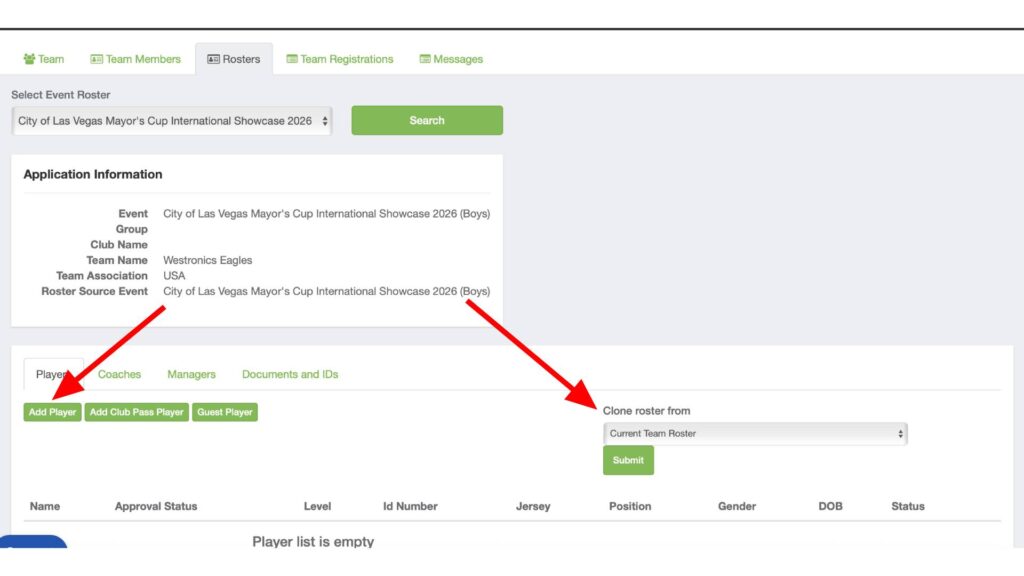
Continue this until all your players have been added. You will see a yellow tag on the players letting you know the player is not yet approved. Once you have completed the credetials check, this will go away.
Instructions For Adding A Coach & Making Them Primary
Here are the instructions for adding a coach to your Las Vegas Mayor’s Cup Roster and making them the Primary coach.
Step 1. Log into your Gotsport Account at system.gotsport.com. Your User name is your email address.
Select Team Managment from the top menu.
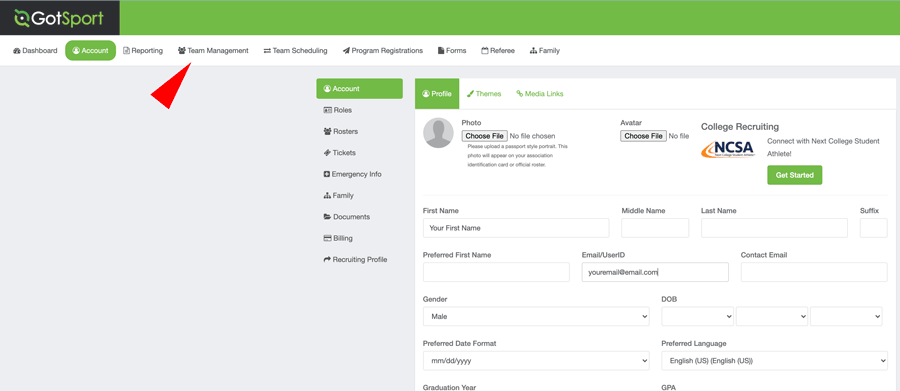
Step 3. Select the team you are working with. If you coach two teams, they should both be listed and you will need to repeat these instructions for both teams.
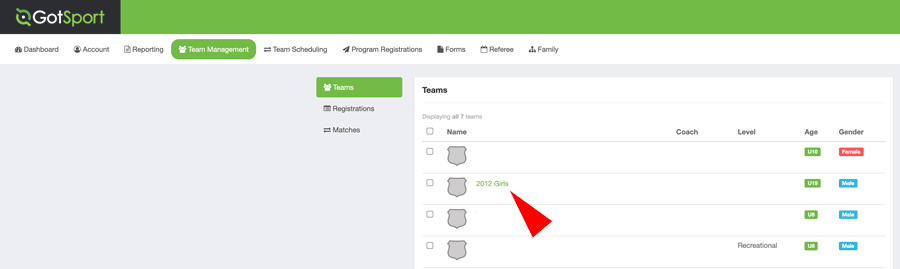
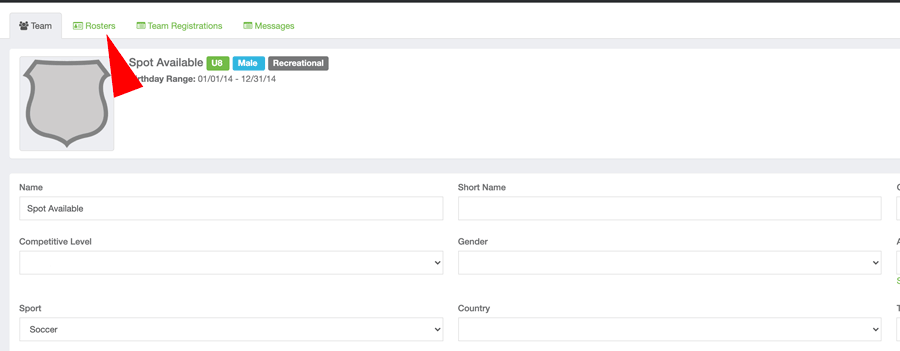
Step 4. Select the Rosters tab
Step 5. From the drop down list “Select Event Roster” pick the Las Vegas Mayors Cup event you are working with. IMPORTANT, remember to click Search.
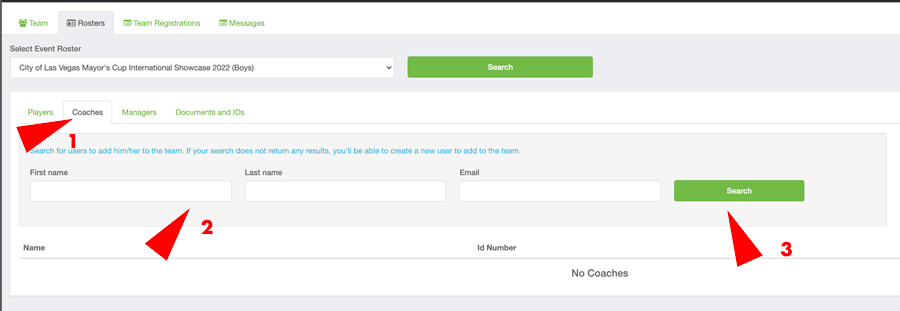
Step 6. Click on the Coaches tab, then enter the coach first name, last name and email. It must be exactly how the coaches accout was set up. If it does not find the coach, skip to step 7A.
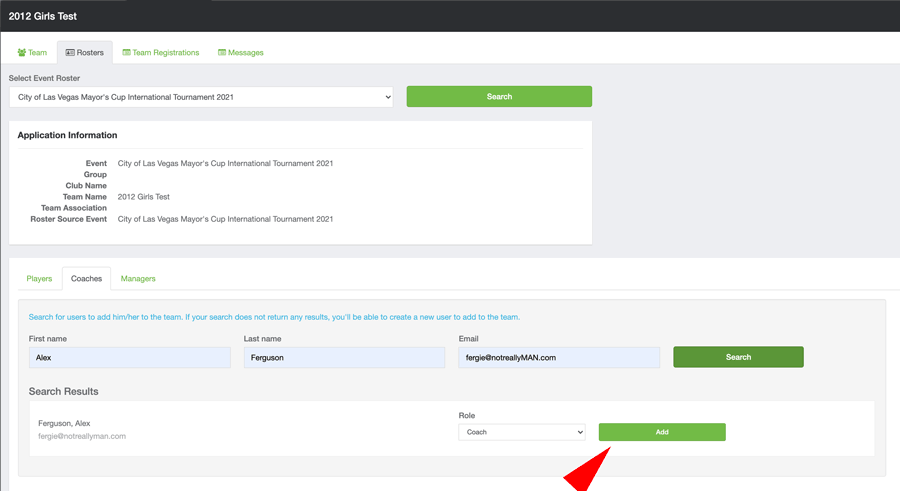
Step 7. If the your coach shows in the search results click add. Go to Step 8
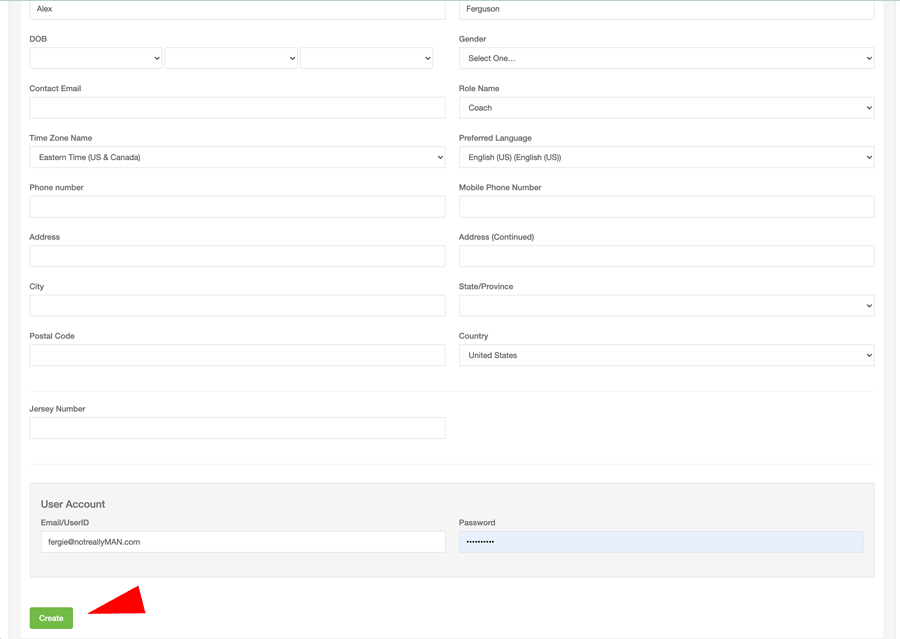
Step 7A. If the coach does not come up in the search, can create an account for them. After you complete the coach information click on Create. If it says the email is already in use, that means the coach has a Gotsport account already and that there was something different about the search. If that happens, it is sometimes easier the have the coach log into thier account and complete adding them to the roster.
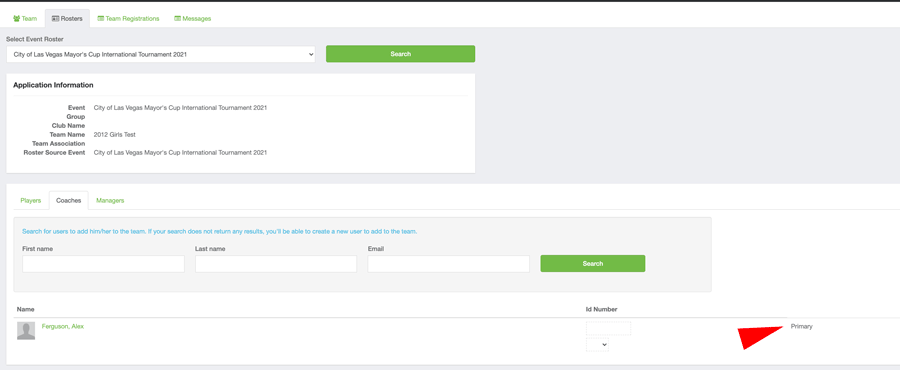
Step 7B. You can now select primary for your coach.
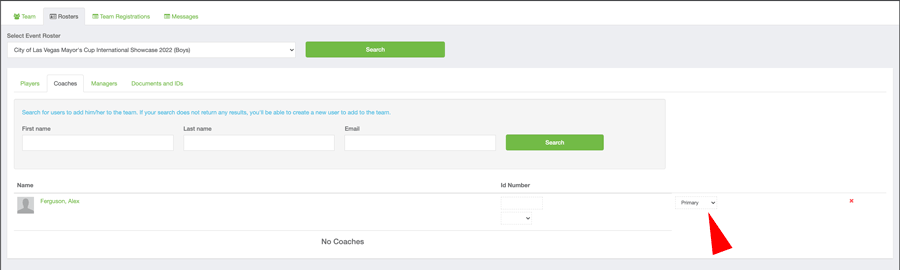
Step 8. Your coach shoulsd now be listed as Primary
• Roster Deadline for February 14-16, 2026 (Boy) Mayor’s Cup is February 10, 2026
• Roster Deadline for February 21-23, 2026 (Girls) Mayor’s Cup is February 17, 2024
• Roster Deadline for October 25-26, 2025 Mayor’s Cup is October 22, 2025

Online Credentials Check-In MANDATORY
Online Credentials Check – Mandatory
The Las Vegas Mayor’s Cup International Tournament and Showcase now utilize online credentials checks for all teams participating in the tournament. With the use of online check-in, we no longer have a team check-in before the tournament. The teams will still need to do a player check-in 30 minutes prior to their match.
Online Credentials Check Instructions
ALL TEAMS MUST COMPLETE MANDATORY ONLINE CHECK-IN
Every team’s Credential Check must be completed by:
• Credentials Deadline for February 14-16, 2026 (Boy) Mayor’s Cup is January 31, 2026
• Credentials Deadline for February 20-22, 2026 (Girls) Mayor’s Cup is February 6, 2026
• Credentials Deadline for October 25-26, 2025 Mayor’s Cup is October 8, 2025
NO EXCEPTIONS
Step 1: Complete your team roster
-
-
Log into your Gotsport account by going to system.gotsport.com
-
Your team has two rosters. A team roster and a Las Vegas Mayor’s Cup roster. Players listed on the team roster are not eligible for the Las Vegas Mayor’s Cup. Only players listed on the Las Vegas Mayor’s Cup roster are eligible.
-
Team Rosters must be for the Las Vegas Mayor’s Cup. There are a number of tournaments each year, so be careful to select the correct one. For Instructions on how to complete your roster, please go [HERE]
-
Players may only be rostered to one team. Tournament Rules.
-
Please make sure that your player number is accurate. This will make the pre-game check in much easier for our field marshals and your team.
-
Don’t forget to add the coaches to your Las Vegas Mayor’s Cup Roster
-
IMPORTANT! If there is even a remote chance a player will be playing the tournament, add them to the roster. You do not want a player to show up to play and not be eligible because they were not put on the roster.
-
DO NOT EMAIL ROSTERS. OFFICIAL ROSTERS ARE CREATED IN GOTSPORT. WE CAN NOT ACCEPT EMAILED ROSTERS.
-
ROSTER UPDATES (If applicable):
-
IF there are changes to your roster after the credentials deadline teams MUST notify the Las Vegas Mayor’s Cup via email at: credentials@lvmayorscup.com. After confirmation of your initial check-in, your roster is locked and you will need to contact to update your roster.
-
THERE ARE NO ROSTER CHANGES ALLOWED AFTER THE ROSTER FREEZE DATE:
-
February 14-16, 2026 (Boys) February 10, 2026
-
February 20-22, 2026 (Girls) February 17, 2026
-
Step 2: Upload an Image of your player passes
-
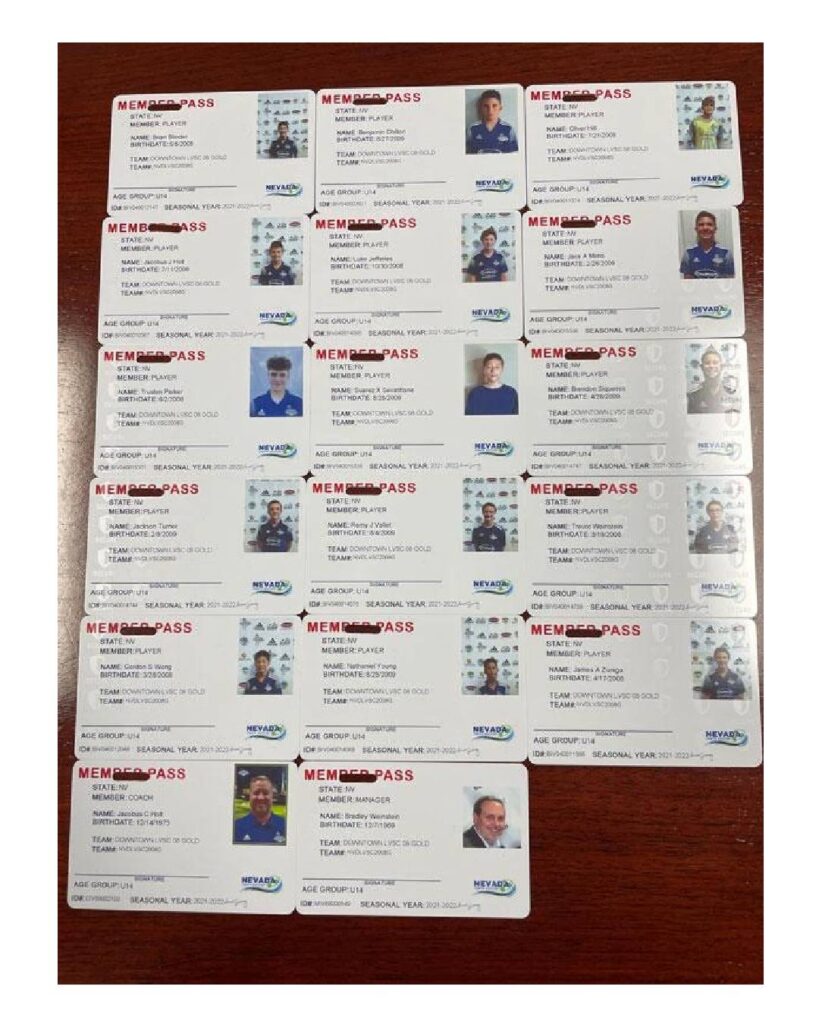
Lay out your player passes in the order they appear on your roster in rows of 3. (see Image). Take a picture of the passes or save as a PDF or .jpg file. Upload the image of your passes into your GotSport application. Instructions to do so are found HERE. Please confirm that the image is clear and large enough to read all of the information on the cards.
-
The image/upload of a player passes does not make the player eligible. Only players listed on the Las Vegas Mayor’s Cup ROSTER are eligible.
-
All player passes must match your roster. If a player is not on the roster, do not include their pass.
-
All passes must be from the same association. We accept passes from USYS, US Club, USSSA, AYSO and SAY. For international teams, we accept passport picture page images.
- IMPORTANT: If you add players or make changes, you do not need to re-upload your entire team, simply email the new or changed players to credentails@lvmayorscup.com.
Step 3: If you will be using guest players, upload an image of your guest player passes with their guest player permission form.
- Guest player forms come from the player’s home association and require the signature of their current coach.
- Guest player passes must be uploaded and have them bring the pass with them.
- IMPORTANT: GUEST PLAYERS MUST BE REGISTERED TO THE SAME ASSOCIATION AS THE TEAM. YOU MAY NOT MIX US CLUB AND USYS REGISTERED PLAYERS. ALL PLAYERS MUST BE REGISTERED TO THE SAME ASSOCIATION.
Step 4: Once your player passes and GotSport event roster has been checked, you will need to check your Match card to ensure that ALL players playing are on your photo match card.
Once your team is checked in, you will receive a copy of your roster by email. PLEASE CHECK YOUR ROSTER CAREFULLY, Players not listed will not be eligible to play.
All managers/coaches can check their match cards by following these instructions… https://support.gotsport.com/as-a-coach/manager-how-to-print-a-match-card
If any player is NOT on your match card, that means the player has not yet been approved/checked in.
Please email credentials@lvmayorscup.com if you have any roster/team check in questions credentials@lvmayorscup.com .

Schedule and Results
Schedules are typically released two weeks prior to the event.
Guest Players
For Players
If you would like to join the guest player pool for the tournament, or if you have a player that would like to be a guest for your team, they need to register with the link below at Gotsport.com Guest Player Program account. There is a differerent link for guest players who are goalkeepers..
For Coaches
If you have already identified a player to guest play for you, you will need to obtain a player action form from the player’s local goverening association giving you premision to use the player. You need this documentatoon for your credentials check. This will typically ask the lending coach to sign off for the guest player. Your team may use up to 5 guest players. You will then need to add the player to your roster [Instructions]. If you are looking for a pool of players to pick from, You will find [Instructions] for pool players here. If you are looking for goalkeepers, select the guest player program from the “Programs” dropdown list.

Schedule and Results
Schedules are typically released two weeks prior to the event.
Guest Players
For Players
If you would like to join the guest player pool for the tournament, or if you have a player that would like to be a guest for your team, they need to register with the link below at Gotsport.com Guest Player Program account. There is a differerent link for guest players who are goalkeepers..
For Coaches
If you have already identified a player to guest play for you, you will need to obtain a player action form from the player’s local goverening association giving you premision to use the player. You need this documentatoon for your credentials check. This will typically ask the lending coach to sign off for the guest player. Your team may use up to 5 guest players. You will then need to add the player to your roster [Instructions]. If you are looking for a pool of players to pick from, You will find [Instructions] for pool players here. If you are looking for goalkeepers, select the guest player program from the “Programs” dropdown list.
Schedule and Results
Schedules are typically released two weeks prior to the event.
Guest Players
For Players
If you would like to join the guest player pool for the tournament, or if you have a player that would like to be a guest for your team, they need to register with the link below at Gotsport.com Guest Player Program account.
For Coaches
If you have already identified a player to guest play for you, you will need to obtain a player action form from the player’s local goverening association giving you premision to use the player. You need this documentatoon for your credentials check. This will typically ask the lending coach to sign off for the guest player. Your team is no longer limited on the number of guest players you can have. You will then need to add the player to your roster [Instructions]. If you are looking for a pool of players to pick from, You will find [Instructions] for pool players here. If you are looking for goalkeepers, select the guest player program from the “Programs” dropdown list. IMPORTANT: PLEASE MAKE SURE THE PLAYER HAS A PLAYER PASS FROM THE SAME ASSOCIATION AS YOUR TEAM. US CLUB GUESTS CAN ONLY PLAYER ON A US CLUB TEAM. USYS PLAYERS CAN ONLY PLAY ON USYS TEAMS.
Medical Release Form
Medical Release Form
Team Managers
Sponsors and Partners
About Us
900 South Valley View Blvd. #175
Las Vegas, NV 89107
702-258-0279
Check out our Frequently Asked Questions